Cupixel: Make art with a twist
- 3.4
- Rating
- 100.00K
- Installs
- Free
- Price

 Analysis by App-foxy
Learning to draw can be frustrating when the blank page feels more intimidating than the subject itself. Cupixel: Make art with a twist takes a different route: rather than leaving me alone with a collection of tools, it places guided art-making at the center of the experience. I found it most appealing when I wanted a structured creative activity without committing to a formal class or searching through several unrelated tutorials.
This is an Art & Design app from Cupixel Inc., aimed at helping people create artwork from the beginning with expert-led guidance. It is free to install, rated for Everyone, and available for devices running Android 8.0 or later. The app has passed the 100K+ install mark, while its average rating sits at 3.4 from roughly 329 ratings. That combination tells me something useful: there is clear interest in the concept, but the experience may not satisfy every kind of artist or every phone.
Guided creativity works best when you want a clear starting point
My first impression is that Cupixel is less about replacing a full drawing studio and more about making the first step easier. Traditional drawing apps often open with brushes, layers, opacity controls, color palettes, and a blank canvas. Those tools are valuable, but they can also create decision fatigue. Cupixel’s central idea is more approachable: follow direction, make progress, and finish with something recognizable.
You May Also Like

 Blood Strike: 2.5 Anniversary
Blood Strike’s Loadouts Turn Every Drop Into a Tactical Gamble
A close look at Blood Strike’s custom loadouts: how fast access to signature weapons reshapes its battle royale rhythm, rewards preparation, and narrows the gap between fights.

 Pandora - Music & Podcasts
Pandora’s Music Is Easy to Start, but Harder to Recover
Pandora’s strength is its low-effort path from a seed to a station. Its weak spot is how much confidence it asks you to place in connection, setup, and quiet recovery.

 8 Ball Pool
8 Ball Pool Is Built on Rivalries, Rematches, and Routine
A close look at the rivalries, rematches, shared routines, and unanswered safety questions that turn a quick pool match into a persistent mobile community.

 Samsung Music
Samsung Music’s Quiet Strength Is Playing What You Already Own
Its reach comes less from spectacle than from dependable access to a personal library. That simplicity is both the app’s strongest retention engine and its ceiling.

 AccuWeather: Weather Radar
AccuWeather Review: A Quick, Clear Forecast for Everyday Decisions
For everyday plans, the best forecast is the one you can understand quickly. AccuWeather makes rain timing, radar, and local conditions easy to act on, with a few trade-offs.

 Hill Climb Racing
Why Hill Climb Racing Still Turns Crashes Into One More Run
A tiny car, a bumpy hill and one more upgrade: Hill Climb Racing keeps resurfacing because its simple chaos makes every near-miss feel personal.
More From Our News Desk



That makes it a natural fit for beginners, casual hobbyists, families looking for a creative activity, and people who enjoy learning by watching and doing. I can also see it working well for someone who already sketches but wants a guided change of pace. The expert-led format gives the session a sense of purpose instead of asking me to invent an exercise before I have even picked a brush.
The important distinction is that this is not simply a digital coloring book. Coloring books offer a fixed outline and a relaxing fill-in task. Cupixel is more useful when I want to feel involved in building the image. At the same time, it is not the same as a professional illustration suite. If my goal were detailed character design, precise vector work, advanced layer management, or a completely unrestricted canvas, I would choose a dedicated drawing application instead.
The strongest part of the experience is the reduction of creative friction. I do not have to spend the first several minutes deciding what to draw or which technique to practice. The guided approach gives me a sequence to follow, which is especially helpful on days when I want to make something but do not have much mental energy for planning.
What a realistic session feels like
Imagine having a short break after work and wanting an activity that is more engaging than scrolling but less demanding than starting a large personal project. Cupixel fits that situation better than a blank-canvas app. I could sit with the phone nearby, follow the lesson, and treat the result as a finished mini-project rather than an unfinished experiment.
The same applies to a quiet weekend with a child or a friend. A guided art session gives everyone a shared starting point, even if their results look different. That matters because beginners often stop enjoying drawing when they compare their first attempts with polished examples. A step-by-step structure makes the process itself feel like the achievement.
I would still prepare the workspace before beginning. A phone screen is convenient, but it is not generous. Keeping the device stable, increasing screen brightness when needed, and avoiding interruptions makes the lesson easier to follow. If I were using a stylus, I would check that it works comfortably with the device before relying on it for a longer session; the app’s appeal does not remove the physical limitations of drawing on a compact screen.
Connectivity changes the rhythm more than the creative idea
The guided nature of Cupixel means network conditions can affect how smooth the session feels. Any experience that presents instructional material or loads creative content can become less convenient when a connection is weak or inconsistent. I would therefore begin an important session somewhere with dependable internet rather than assume that a crowded train, a basement room, or a congested public network will provide the same experience.
This is particularly relevant when the app is used spontaneously. A person may download it at home and then expect to use it during a commute, only to discover that the experience is less predictable in a low-signal environment. I would not plan around a connection-free workflow unless the app itself clearly indicates that the needed material is available that way. For me, that makes Cupixel better suited to a connected home, classroom, studio, or café than to a deliberately offline creative kit.
A stable connection also helps preserve concentration. Drawing already requires attention, and repeated loading pauses can break the sense of following a lesson. When the network is reliable, the guidance feels like one continuous activity. When it is not, the artistic task can become secondary to waiting, retrying, or wondering whether the next part has loaded.
My practical advice is simple: open the app before the session, check that the selected content behaves normally, and avoid switching between several demanding apps at the same time. That small preparation is more valuable here than it would be in a basic offline sketchpad because the guided sequence is central to the product.
Using it comfortably on a phone or tablet
Mobile use is one of Cupixel’s advantages, but the form factor also shapes what I would attempt. A phone is ideal for a short guided exercise, a quick creative break, or following instructions while sitting at a kitchen table. A larger screen is more comfortable for seeing details and keeping the guidance visible while working, especially if I want to make deliberate marks rather than broad, casual ones.
I would not judge the app only by how enjoyable it is during the first few minutes. The real question is whether the device remains comfortable throughout a complete session. On a small display, my hand can cover the working area, and frequent zooming or repositioning may become tiring. That is not necessarily a flaw in Cupixel; it is a trade-off of mobile art-making. Still, people who already know they dislike drawing on phones may prefer a tablet or a computer-based alternative.
Notifications are another practical interruption. A guided activity benefits from uninterrupted attention, so I would use a focus mode or silence nonessential alerts before starting. This is especially useful for children, where a single pop-up can pull attention away from the lesson. The app is approachable, but the surrounding phone environment can work against that simplicity.
For a parent, the Everyone rating makes Cupixel easier to consider as a shared creative tool. I would still stay involved with younger users, not because the age rating creates a problem, but because guided art is more rewarding when someone talks through the choices and encourages experimentation. The app can provide direction; it cannot replace the social part of making art together.
What happens when the experience is interrupted
Connectivity failures are most annoying when they occur after I have already settled into a drawing. A weak signal, a temporary service interruption, or an accidental app switch can make the session feel fragile. I would handle that by saving or completing natural stopping points whenever possible, rather than treating the activity like a long uninterrupted production workflow.
If content does not load, my first response would be to check the connection, move to a stronger signal, and reopen the relevant part of the experience. I would avoid repeatedly tapping controls while the app is still responding, since that can make it harder to tell whether the issue is a delay or a genuine failure. Closing other network-heavy apps can also help in a busy environment.
The larger lesson is that Cupixel rewards short, intentional sessions more than careless multitasking. I would not start a lesson moments before leaving home or while relying on unstable public Wi-Fi. For a serious personal project, I would use a drawing tool that gives me more direct control over files and workflow. Cupixel is better when the goal is a guided creative moment, not when I need a guaranteed production pipeline.
Recovery also includes managing expectations about the finished image. A disrupted lesson can make it tempting to rush through the remaining steps just to reach the end. I would rather return later and continue carefully than produce a hurried result. The value is in learning the process, not merely obtaining a picture as quickly as possible.
Being sensible about data and in-app spending
Cupixel is free to download, which lowers the barrier to trying the concept. The app does include in-app purchases ranging from $7.99 to $99.99 per item, so I would pay attention before committing to anything beyond the free experience. The wide span matters: a casual user may be comfortable exploring at no cost, while someone who wants a deeper collection of guided material should decide in advance how much the expanded experience is worth.
On a mobile connection, I would also be conscious of how much time I spend streaming or loading instructional content away from Wi-Fi. I would not assume that a short-looking session has no network impact, particularly if I repeat lessons or browse several options. Anyone with a limited data plan should test the app at home first and make a habit of using a trusted connection for longer creative sessions.
Battery use is worth considering too. Keeping the screen bright while drawing and maintaining a network connection can make a phone feel less efficient than it does during ordinary reading. I would begin with a reasonably charged device and avoid starting a lengthy activity when I need the phone for navigation or an urgent call afterward.
There is also a creative form of data-consciousness: do not rush into purchases simply because the guided format makes the next activity feel tempting. I would first decide whether the teaching style suits me, whether the screen size is comfortable, and whether I can maintain a reliable connection. Those factors affect the value more than the number of available choices.
Where it beats ordinary drawing apps, and where it does not
Compared with a typical sketching app, Cupixel gives me more direction and less initial freedom. That is a strength for a beginner who wants to learn through action. A conventional drawing app wins when I already have a subject in mind and need tools such as layers, detailed brush control, or a flexible workspace. The choice depends on whether I need instruction or independence at that moment.
Compared with video tutorials, Cupixel has the potential to feel more connected to the act of making. A video can be paused and copied, but it often leaves me responsible for translating a demonstration into my own workflow. Cupixel’s guided structure is more appealing when I want the creative activity to feel organized from start to finish. On the other hand, viewers who prefer to jump between artists, techniques, and unrelated subjects may find a broad video platform more flexible.
Compared with a physical art class, the app is more convenient and private. I can try it at home without arranging a schedule or bringing supplies to a studio. The trade-off is that a mobile lesson cannot offer the same personal correction, group energy, or tactile feedback as an in-person teacher. I would choose Cupixel for accessible practice and choose a class when feedback and community are the main reasons I want to learn.
One less obvious trade-off is ownership of the creative rhythm. The guidance helps me avoid getting stuck, but it also means I am following someone else’s sequence. That is excellent for building confidence and less suitable for artists who enjoy wandering, making mistakes, and changing direction halfway through a piece. Knowing which mood I am in before opening the app prevents disappointment.
Who should try it and who should skip it
I would recommend Cupixel to a beginner who wants more than a blank canvas, a casual artist looking for a planned activity, or a family seeking an approachable way to make art together. It also makes sense for someone who has downloaded drawing tools before but abandoned them because the interface felt too open-ended. The guided format gives that person a clearer reason to return.
I would be more cautious if the user has an older or cramped phone, a very limited data plan, unreliable internet access, or a strong preference for fully offline tools. I would also point advanced illustrators toward a dedicated professional app if they need precise editing, elaborate project organization, or complete control over every stage. Cupixel is not a universal replacement for those tools, and it does not need to be one to be useful.
The rating of 3.4 suggests a mixed public response rather than universal approval. I read that as a reason to try the free entry point carefully, not as an automatic rejection. The concept is appealing, but the right fit depends heavily on device comfort, connection quality, and whether guided instruction matches the way I like to create.
My verdict on the connected creative experience
After looking at the complete experience, I see Cupixel as a friendly bridge between passive tutorials and intimidating drawing software. Its best quality is not an enormous toolbox; it is the way guidance turns “I should make something” into a concrete activity. That makes it easy to recommend for beginners and casual sessions, especially when I have a stable connection and a comfortable screen.
The limitations are equally clear. Network interruptions can disturb the lesson, mobile screens can make detailed work tiring, and the in-app purchase range means I would explore before spending. People wanting unrestricted professional control or a dependable offline sketchbook should choose another option. Those are meaningful boundaries, not minor details.
For me, the sensible way to approach it is to start at home on a reliable connection, use a larger screen when available, silence distractions, and treat the first sessions as a test of the teaching style rather than a commitment. If that guided rhythm makes drawing feel less intimidating, Cupixel can become a genuinely enjoyable creative companion. If I want total freedom from the start, a conventional drawing app will probably serve me better.
Developed by Cupixel Inc., the app is currently at version 10.15.3 and remains free to try for Everyone on compatible devices. My final recommendation is therefore selective but positive: choose Cupixel when structure, encouragement, and a connected guided session matter more than unlimited artistic control.
FAQs for Cupixel: Make art with a twist
01What is Cupixel: Make art with a twist?
Cupixel is a creative drawing and painting app designed to help users make artwork through guided lessons and interactive projects. It combines video instruction, digital tools, and themed activities so beginners can follow along step by step while more experienced artists can experiment at their own pace. The app focuses on making art approachable, entertaining, and suitable for different skill levels.
02Is Cupixel suitable for beginners with no drawing experience?
Yes, Cupixel is primarily designed to make drawing and painting easier for beginners. Its guided classes generally break projects into manageable stages, explaining techniques as you work. You do not need formal art training to start, although patience and practice are still helpful. Users who already have experience may also enjoy the app for inspiration, structured exercises, and creative challenges.
03Does Cupixel: Make art with a twist require a subscription?
Cupixel may offer free content or trial access, but some lessons, projects, and premium features can require a subscription or in-app purchase. The exact pricing, trial conditions, and available content may vary by platform and region. Before confirming a purchase, check the subscription screen carefully, including renewal terms, billing frequency, and cancellation instructions provided through the App Store or Google Play.
04What equipment or materials are needed to use Cupixel?
The basic app experience requires a compatible Android or iOS device, an internet connection for downloading lessons or accessing online content, and enough storage for the application. Depending on the project, you may also need traditional supplies such as paper, pencils, paints, brushes, or other craft materials. Carefully review each lesson beforehand so you can prepare the recommended tools.
05Is Cupixel safe for children and does it work offline?
Cupixel can be an enjoyable creative tool for families, but parents should review the app’s age rating, privacy policy, advertising, and in-app purchase options before allowing children to use it unsupervised. Offline availability may be limited because lessons and features can depend on streaming or online access. Download required content in advance if the app provides that option, and use parental purchase controls.
Pros
- Step-by-step guidance makes drawing approachable for beginners.
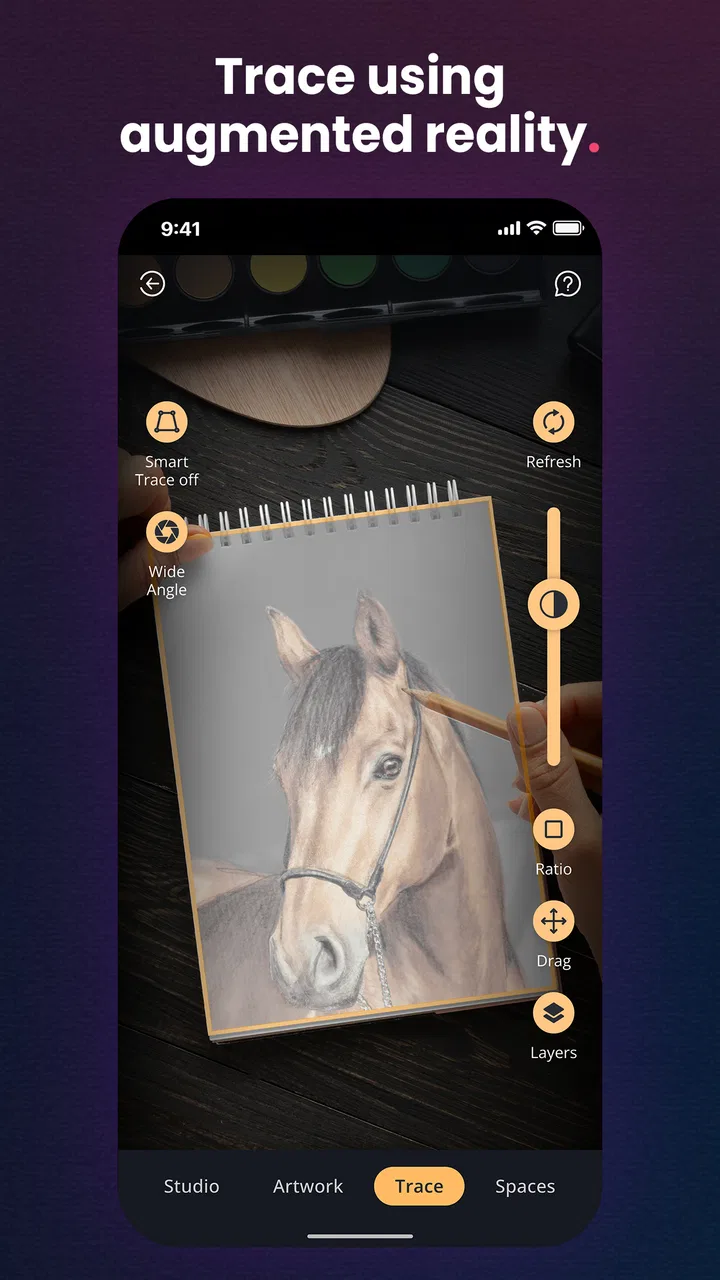
- Augmented reality helps users trace designs with better proportions.
- Offers creative projects suitable for different ages and skill levels.
- Finished artwork can be personalized with colors and decorative details.
- A fun way to practice observation
- sketching
- and artistic confidence.
Cons
- Some features may require a paid subscription or in-app purchases.
- Tracing works best with good lighting and a steady phone position.
- The experience can feel limiting for artists seeking complete freedom.
- Compatible devices may vary
- especially for advanced AR features.
- Long sessions may be uncomfortable when holding the phone overhead.

Cupixel: Make art with a twist
Gallery